AV receivers explained: channels, HDMI 2.1, room correction and impedance
What 7.2 and 9.2.4 mean on an AV receiver, how HDMI 2.1 passthrough and eARC work, why room correction matters and how to match speaker impedance safely.
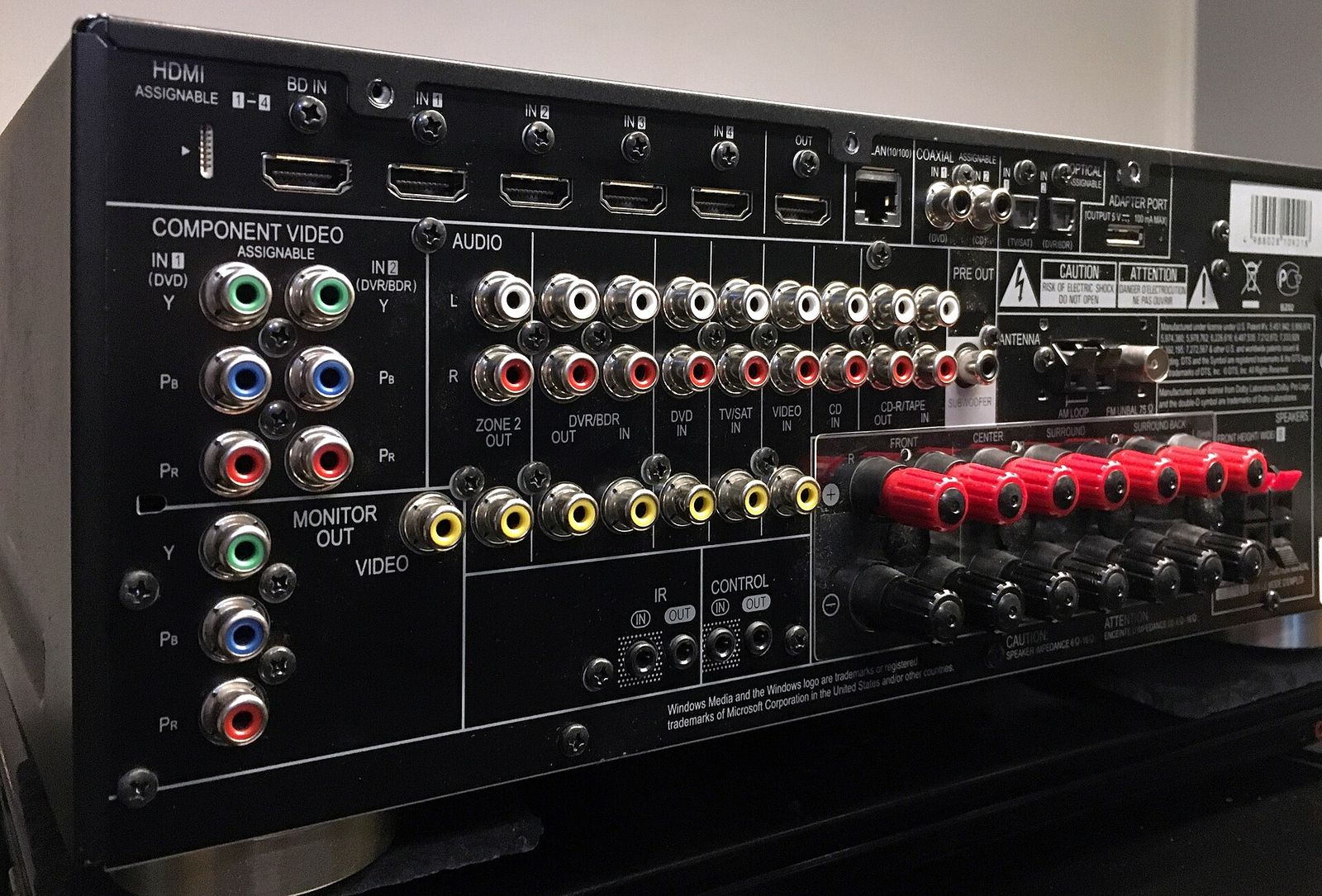
An AV receiver is the hub of a home cinema: it switches between your sources, decodes surround formats such as Dolby Atmos, and powers every speaker in the room. It is also one of the most spec-heavy boxes you can buy, with channel counts, HDMI versions, watts per channel and room-correction systems all printed on the front. This guide explains which of those numbers matter, which are marketing, and how to choose a receiver that suits your speakers, your TV and your room.
Receiver or soundbar?
A soundbar puts everything in one enclosure under the TV. A receiver does the electronics only, and you add separate speakers. That makes a receiver larger and more work to set up, but it gives you:
- Real speakers in the right places, including true rear surrounds and ceiling or height speakers.
- Upgrades in stages: start with two or three speakers and add more later.
- More inputs, for several consoles, a disc player and a streaming box.
- Better music performance with good stereo speakers.
If you want one box and minimal wiring, read our guide to soundbar channels first. If you want a system that can grow, a receiver is the usual answer.
Reading the channel numbers
Receivers use the same notation as soundbars: ear-level channels . subwoofer outputs . height channels.
| Label | Speakers it can drive | Typical layout |
|---|---|---|
| 5.1 | Front left, centre, front right, two surrounds, one subwoofer | Classic surround in a small or medium room |
| 5.2 | As 5.1, with two subwoofer outputs | Smoother bass across several seats |
| 7.1 | Adds two rear surrounds | Larger rooms with seating away from the back wall |
| 5.1.2 | 5.1 plus two height speakers | Entry point for Dolby Atmos |
| 7.1.4 / 9.2.4 | More surrounds and four height speakers | Dedicated cinema rooms |
Two details are easy to miss:
- Amplified channels versus processing channels. A receiver might process 11 channels but only power 9. The extra channels need an external power amplifier connected to pre-outs. Check both figures.
- Subwoofer outputs are line-level. The ".2" means two outputs for powered subwoofers, not two amplified channels. The subwoofers have their own amplifiers.
Many receivers let you reassign unused channels, for example to drive the front speakers with two channels each (bi-amping) or to power speakers in a second room.
HDMI 2.1, 4K/120 and passthrough
Video does not need to be processed by the receiver, but it often passes through it: your console or streaming box connects to the receiver, and one cable goes on to the TV. That means the receiver's HDMI inputs need to keep up with your sources.
What to check:
- HDMI 2.1 features on the inputs you'll use. Some receivers support 4K at 120 Hz or 8K on only a few of their inputs. Count how many you need.
- 4K/120, VRR and ALLM for current consoles and gaming PCs. VRR (variable refresh rate) reduces tearing; ALLM (auto low latency mode) switches the TV to its game mode automatically.
- HDR formats: HDR10 is universal; check for Dolby Vision and HDR10+ passthrough if your TV and sources use them.
- HDCP 2.3 copy protection support, which current 4K sources expect.
- eARC on the output, so sound from the TV's own apps travels back to the receiver in full quality, including lossless formats.
Rule of thumb: if a source supports 4K/120, either connect it to an HDMI 2.1 input on the receiver or connect it directly to the TV and let eARC carry the sound back.
The second approach is a useful fallback. It works with any eARC receiver and avoids the receiver adding a link in the video chain. Our guide to TVs for gaming and HDMI 2.1 covers the TV side.
Power ratings: what the watts really mean
Receiver power figures are hard to compare because manufacturers measure them differently. Look at how a figure was measured, not just the number:
- Number of channels driven. "Two channels driven" gives a higher figure than "all channels driven". Real films rarely ask for full power from every channel at once, but the all-channel figure is more honest.
- Frequency range. A rating "20 Hz–20 kHz" is more demanding than one quoted at a single frequency such as 1 kHz.
- Distortion and load. Check the percentage distortion and the impedance (8 or 6 ohms) the figure applies to.
In practice, speaker sensitivity and room size matter as much as watts. A speaker rated around 90 dB (1 W/1 m) needs much less power to reach the same volume as one rated around 84 dB. Typical living rooms with reasonably sensitive speakers rarely need more power than a mid-range receiver provides.
Speaker impedance and matching
Impedance, measured in ohms, describes how much a speaker resists the current from the amplifier. Most home speakers are rated at 8 ohms or 6 ohms, and some at 4 ohms.
- Lower impedance draws more current and makes the amplifier work harder and run hotter.
- Most receivers are designed for 6–8 ohm speakers and list a minimum impedance on the back panel.
- Some receivers have an impedance setting for 4 or 6 ohm speakers. It usually lowers the amplifier's supply voltage to protect it, and slightly reduces maximum output.
- A speaker's nominal rating is an average; the actual impedance dips lower at some frequencies.
If your speakers are rated below the receiver's stated minimum, check the manufacturer's guidance, keep the receiver well ventilated, and consider a separate power amplifier for the main speakers. Never connect two speakers in parallel to one channel unless the receiver is designed for it, because that halves the impedance.
Room correction and calibration
The room shapes the sound as much as the speakers do. Bass in particular builds up in some seats and disappears in others. Almost every receiver includes an automatic room-correction system: you place a supplied microphone at several listening positions, and the receiver plays test tones and then:
- sets the distance (delay) and level of each speaker so sound arrives together and balanced;
- chooses crossover points, the frequency below which bass is sent to the subwoofer;
- applies equalisation to reduce room resonances.
Systems differ in how many measurement positions they take and how much you can adjust afterwards. Some offer optional apps or advanced versions with finer control, and some can manage two subwoofers independently. Whatever the system, run it with the room as you normally use it, then trust your ears and adjust levels or the target curve if needed. Small receivers in awkward rooms benefit most.
Streaming, multi-room and other features
Beyond the cinema basics, receivers vary in what else they do:
- Built-in streaming over Wi-Fi and Ethernet, often with support for common casting and multi-room systems.
- Bluetooth for quick playback from a phone.
- Phono input for a turntable with a moving-magnet cartridge.
- Zone 2 outputs for speakers or an amplifier in another room.
- Pre-outs for adding a separate power amplifier later.
- Network control apps and HDMI-CEC, so your TV remote can control volume.
The short version
- Count the speakers you have and want to add, then choose a receiver with enough amplified channels; pre-outs help if you might outgrow it.
- Check how many HDMI 2.1 inputs support 4K/120, VRR and the HDR formats you use, plus eARC on the output.
- Read power ratings with the channels driven and frequency range in mind, and pay attention to speaker sensitivity.
- Match impedance: most receivers suit 6–8 ohm speakers; check the minimum on the back panel before using 4 ohm speakers.
- Use room correction, ideally with two subwoofer outputs if you plan a second sub.
- Leave space for ventilation above and around the receiver, especially in a cabinet.
Bloiq is reader-supported. Some links may earn us a commission; it never affects what we write. How we make money.
Cover photo: Pittigrilli, CC BY-SA 4.0, via Wikimedia Commons