Home / Auto · Product overviews / Car & Vehicle Electronics / On-Dash Cameras · More from REDTIGER
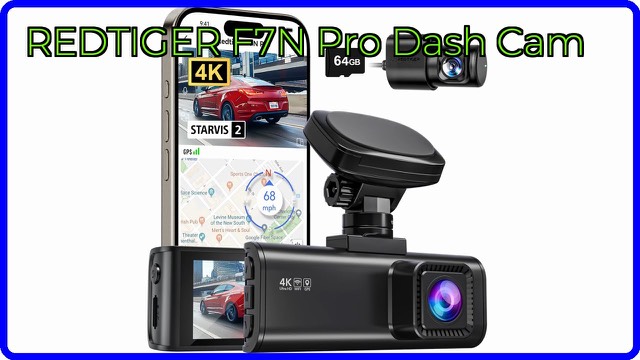
REDTIGER F7NP Dual Dash Cam with Adhesive Pad: features and specs
The REDTIGER F7NP is a front-and-rear dash cam with 4K front recording, F1.5 lens, GPS and WiFi app control. A look at what each feature means.
This page contains an affiliate link, marked as such. If you buy through it, Bloiq may earn a commission at no extra cost to you.
The REDTIGER F7NP is a dual-channel dash cam that records the road ahead in up to 4K and the rear in 1080P. This listing includes a round double-sided adhesive pad for mounting. Below is what each feature means and what to check before fitting one.
Front and rear resolution
REDTIGER lists up to Ultra HD 4K (3840 x 2160) for the front camera and Full HD 1080P for the rear. Higher resolution gives more detail for reading things like road signs and number plates, though results still depend on light and speed. The front lens has a 170-degree view and the rear lens 140 degrees, which REDTIGER says reduces blind areas.
Night vision explained
REDTIGER describes an optical lens with a large F1.5 aperture and six layers, combined with HDR and WDR. A larger aperture (a lower F-number) lets in more light, which generally helps after dark. HDR and WDR balance bright and dark parts of a scene, for example headlights against a dim street. These features help but have limits, and no dash cam sees everything at night.
WiFi and the app
The camera connects to your phone over WiFi using the REDTIGER app for iOS and Android. You can view, play back and manage recordings, download and edit clips, and share them. This is convenient because you don't have to remove the memory card for every clip.
GPS
Built-in GPS records route, speed and location with each video. REDTIGER says you can follow the route on a map through the app or with its Windows and Mac GPS player software, which may serve as extra context after an incident.
Loop recording, G-sensor and parking mode
Loop recording overwrites the oldest clips once the card is full so recording never stops. A G-sensor detects a sudden collision and locks that clip against overwriting. REDTIGER also lists a 24-hour parking monitor with a time-lapse function. It requires a hardware kit, which this listing does not mention as included, so confirm before relying on it.
Mounting with the adhesive pad
The round double-sided adhesive pad sticks the camera to the windscreen. Adhesive mounts are usually small and neat, but harder to reposition than a suction cup, so choose the spot first. Clean the glass and follow the manual. Keep the camera clear of your view and outside swept areas, and check local rules on windscreen mounting.
Who it suits
It suits drivers who want a record of both front and rear, people comfortable with phone-app control, and those who prefer a stuck-on mount.
What to check before you buy
- Card: check whether a memory card is included, and its size, as this listing doesn't say.
- Power: parking mode needs a hardwire kit.
- Rear camera: make sure the cable is long enough for your vehicle.
- Mount: adhesive mounts are semi-permanent, so plan placement.
- Local rules: recording and mounting laws vary by region.
The short version
- A dual dash cam with up to 4K front (170°) and 1080P rear (140°) recording.
- F1.5 aperture lens with HDR and WDR for low light.
- WiFi app control, built-in GPS and a G-sensor that locks collision clips.
- Loop recording and a 24-hour parking mode that needs a hardware kit.
- Mounted with a round double-sided adhesive pad.
Bloiq is reader-supported. Some links may earn us a commission; it never affects what we write. How we make money.