Home / Tools & DIY · Product overviews / Hardware / Deadbolts · More from eufy Security
eufy Security Smart Lock C210 (T8502): features, setup and compatibility
The eufy Security Smart Lock C210 is a Wi-Fi deadbolt with a touchscreen keypad and no bridge needed. What the specs mean and what to check before fitting it.
This page contains an affiliate link, marked as such. If you buy through it, Bloiq may earn a commission at no extra cost to you.
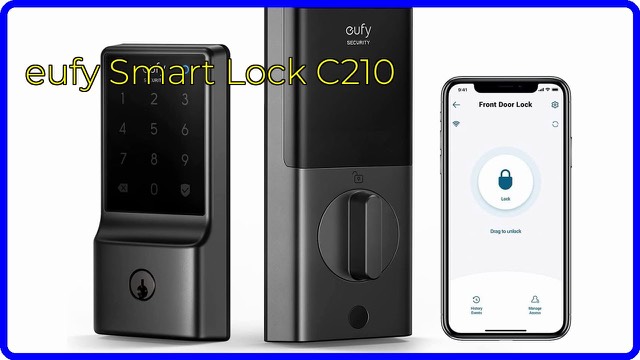
The eufy Security Smart Lock C210 (model T8502) is a keyless deadbolt for a front door. It has Wi-Fi built in, a touchscreen keypad and an app, so you can lock, unlock and check activity without carrying only a key. It comes in a nickel finish and runs on four AA batteries.
Built-in Wi-Fi, no bridge
Many smart locks talk to a separate hub that plugs into your router. eufy says the C210 does not need one: it connects to Wi-Fi directly, and the eufy Security app handles remote control, access management, real-time notifications and an event history. In general, built-in Wi-Fi simplifies setup, though it can use more battery than locks that rely on a hub.
Five ways to unlock
According to eufy, the door can be opened in five ways:
- through the eufy Security app;
- with the keypad;
- with the physical key;
- from an Apple Watch;
- by voice, using Alexa or Google Voice Assistant.
A physical key backup is useful because it keeps the door usable if the batteries run out or the network is down. Voice unlocking on any smart lock normally requires a spoken code or confirmation, so check the manual for how that works.
Working with a eufy doorbell
If you already use a eufy doorbell, the lock can be added to routines in the same app, so keyless entry and the doorbell can be managed together. The lock works without one.
Installation and compatibility
eufy says the C210 fits most standard US deadbolts and installs in about 15 minutes without drilling. The key words are "standard" and "US": the lock replaces the deadbolt's existing hardware, so door thickness, bore size and backset need to match what the manual specifies. Doors with unusual preparations may not fit. Follow the manual, and check any local rules that apply to door hardware and rental properties.
Durability and alerts
The listing states the lock is BHMA certified after more than 100,000 lock-and-unlock cycles. BHMA is the US Builders Hardware Manufacturers Association, which tests hardware against graded standards. The lock can also send an alarm when it detects an unusual attempt to open the door. eufy offers 18 months of aftersales service with 24/7 customer support.
Who it suits
It suits households that want keypad entry for family members, visitors or tradespeople, and remote checks on whether the door is locked. It is not a substitute for good door and frame hardware, which a lock depends on.
What to check before you buy
- Deadbolt type: confirm your door has a standard US deadbolt prep.
- Finish and handing: check the nickel finish suits your other hardware.
- Wi-Fi at the door: make sure your signal reaches the front door.
- Batteries: it takes four AA cells; look at the manual for replacement alerts.
- Door alignment: a door that sticks or has a misaligned latch can make any motorized deadbolt work harder.
- Access rules: decide who gets codes, and how often you'll change them.
The short version
- A Wi-Fi smart deadbolt, model T8502, with a touchscreen keypad and no bridge.
- Five unlock methods, including the app, keypad, key, Apple Watch and voice assistants.
- Fits most standard US deadbolts, with a quoted 15-minute install and no drilling.
- BHMA certified for over 100,000 cycles; alarm for unusual open attempts.
- Four AA batteries; 18-month aftersales service.
Bloiq is reader-supported. Some links may earn us a commission; it never affects what we write. How we make money.