Home / Tools & DIY · Product overviews / Beading & Jewelry Making / Engraving Machines & Tools · More from ACMER
ACMER S1 3.5W Laser Engraver (130x130 mm): features, specs, who it suits
A compact preassembled 3,500 mW diode laser engraver and cutter with a 130x130 mm working area, LightBurn and LaserGRBL support, and a 12-month warranty.
This page contains an affiliate link, marked as such. If you buy through it, Bloiq may earn a commission at no extra cost to you.
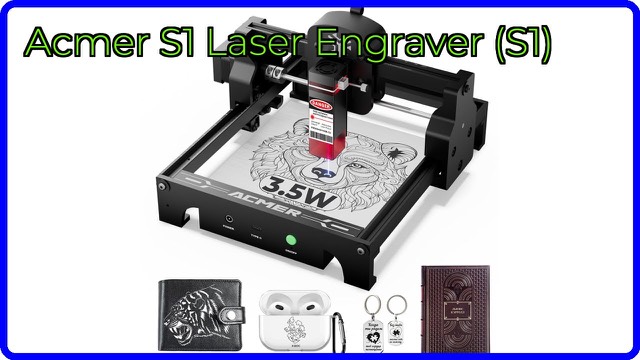
The ACMER S1 (model S1_3.5W) is a small desktop diode laser that engraves designs into materials such as wood and leather and can cut thin sheet stock. It arrives preassembled, so the main setup job is fitting and focusing the laser head. It is aimed at hobbyists, crafters and small makers who want a compact machine for a home workshop.
What 3,500 mW means
The S1 has a 3,500 mW (3.5 W) optical output from a diode laser. ACMER gives the overall machine power as up to 36 W, which is the electrical draw, not the beam power. The two figures are easy to confuse. Beam power is what determines what the laser can mark or cut, and in general a lower-power diode laser works best on thin, light materials and needs slower, repeated passes for anything thicker.
ACMER lists a 455 ±5 nm wavelength, which is in the blue range, and a 2 mm focal length. It also mentions harmonic lens technology for fine detail.
Speed and precision
The brand quotes a maximum engraving speed of 10,000 mm/min and a repeat positioning accuracy of 0.01 mm. Repeat accuracy describes how consistently the head returns to the same point, which matters for multi-pass jobs and aligning a design with a workpiece. Real results depend on the material, focus and settings.
Materials and what it can cut
ACMER says the S1 engraves wood, bamboo, leather, plastic, PCB, aluminium oxide, coated metals and ceramics. It says it can cut thin plywood, MDF and opaque acrylic. Blue diode lasers generally struggle with clear or blue acrylic, because the beam passes through or reflects instead of being absorbed, and bare metals are typically marked only with a coating or marking spray. Check the manual for material guidance.
Size, weight and power
- Machine size: 250 x 250 x 162 mm; weight about 2 kg
- Working area: 130 x 130 mm
- Frame: industrial-grade aluminium
- Power input: DC 12 V, 2 A
- Packaged size: 317 x 317 x 197 mm
The listing also shows overall dimensions of 12.6 x 12.6 x 7.9 inches. A 130 mm square work area suits small items such as coasters, tags, small signs and cards, not large panels.
Software and files
The S1 works with macOS, Windows and Linux. ACMER lists support for LightBurn and LaserGRBL, and for NC, DXF, BMP, JPG and PNG files. Check whether LightBurn needs a separate licence for your setup. The brand also says its multi-core processor can control multiple machines at once.
Safety and support
The listing mentions Class 4 laser certification, NRTL test-lab documentation and testing to IEC 60825-1, plus a 12-month warranty and round-the-clock support. A laser of this type can damage eyes and start fires. Follow the manual, wear laser safety eyewear rated for the wavelength, never leave a running job unattended, and keep the area ventilated.
Who it suits
It suits beginners and hobbyists who want to try laser engraving, and makers producing small custom items. It suits people with limited bench space who value a machine that is easy to move.
What to check before you buy
- Work area: confirm 130 x 130 mm is large enough for your projects.
- Materials: check that your materials suit a 3.5 W blue diode laser.
- Ventilation: plan for fume extraction and a fire-safe surface.
- Eyewear: have suitable laser safety glasses ready.
- Software: check your computer and file formats match.
- Local rules: check what local regulations say about laser use.
The short version
- A compact, preassembled 3,500 mW diode laser engraver and cutter.
- 130 x 130 mm working area; about 2 kg; DC 12 V input.
- Works with LightBurn and LaserGRBL on macOS, Windows and Linux.
- Best suited to thin, light materials and small projects.
- Follow the manual and use proper eye protection and ventilation.
Bloiq is reader-supported. Some links may earn us a commission; it never affects what we write. How we make money.