Home / Tools & DIY · Product overviews / Beading & Jewelry Making / Engraving Machines & Tools · More from ACMER
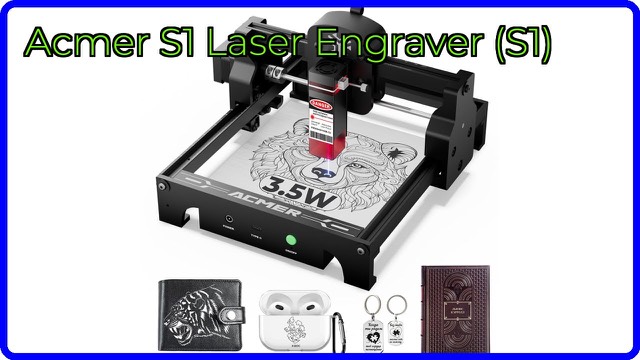
ACMER S1 2.5W Portable Laser Engraver: engraving area, specs and uses
A pre-assembled mini laser engraver with a 130 x 130mm work area, 2.5W laser output and X/Y limit switches. What the specs mean and what to check.
This page contains an affiliate link, marked as such. If you buy through it, Bloiq may earn a commission at no extra cost to you.
The ACMER S1 is a compact desktop laser engraver for small craft projects. It arrives pre-assembled, so you connect it, place your material under the laser and start. It suits makers who want to personalise small items rather than cut large sheets.
What the laser can do
The listing's headline figure is 2,500 mW, which is 2.5W of laser output. The listing's feature text also mentions "2500W/3500W", which looks like a typing error, so rely on the 2.5W figure and confirm it with the brand. At this power level, a laser typically engraves wood, leather, dark acrylic and coated or anodised surfaces and cuts thin sheets slowly. ACMER says it can engrave over 100 materials and also describes cutting capability. How well a material works depends on its colour, thickness and finish, and bare metal usually can't be marked by a diode laser without a coating.
Small by design
The brand calls it highly portable. The dimensions given are 10.2 x 8.3 inches (about 26 x 21 cm), and it works within a 130 x 130mm (about 5 x 5 inch) engraving area. That's enough for coasters, keyrings, name tags, small ornaments and phone-case-sized pieces, and ACMER says it can process several small metal ornaments at once and engrave small ceramics. Larger projects won't fit, so measure your pieces.
Detail and positioning
ACMER says the S1 maintains an ultra-fine laser output for detailed, lifelike engravings. A laser scale on the frame gives reference points along the X and Y axes, which helps you position work precisely, for example when engraving a logo in the centre of a small item.
Setup and limit switches
Because the machine is pre-assembled, there's no frame to build. Limit switches on both the X and Y axes stop the laser head at the edge of its travel and provide a reset reference, which helps the machine find its home position at the start of a job. Engraving software on a computer or phone typically does the design work, so check what the S1 supports.
Laser safety
Even low-power diode lasers can damage eyes and ignite materials. Standard advice is to wear laser-rated eye protection, never leave the machine unattended while it runs, keep a fire extinguisher nearby, ventilate fumes and avoid reflective or unknown materials. Follow the manual.
Who it suits
It suits hobbyists, crafters and small-run makers who want to personalise wood, leather and acrylic pieces on a desk, and anyone who would like a laser without a build project.
What to check before you buy
- Materials: confirm that the ones you want are supported at 2.5W.
- Work area: check that 130 x 130mm covers your biggest piece.
- Software and connection: confirm which programs and operating systems work, and how data gets to the machine.
- Power and ventilation: plan a stable workspace with airflow.
- Eye protection: check what comes in the box.
The short version
- A pre-assembled mini laser engraver rated at 2,500 mW (2.5W).
- 130 x 130mm engraving area with a scale on the frame.
- X and Y limit switches for safety and homing.
- Aimed at wood, leather, acrylic and similar materials.
- Use eye protection and never leave it running unattended.
Bloiq is reader-supported. Some links may earn us a commission; it never affects what we write. How we make money.