Home / Tools & DIY · Product overviews / Beading & Jewelry Making / Engraving Machines & Tools · More from ACMER
ACMER S1 2.5W Portable Laser Engraver: features, specs and who it suits
The ACMER S1 is a compact, pre-assembled desktop laser engraver with a 130 x 130 mm work area and limit switches. What the specs mean and what to check first.
This page contains an affiliate link, marked as such. If you buy through it, Bloiq may earn a commission at no extra cost to you.
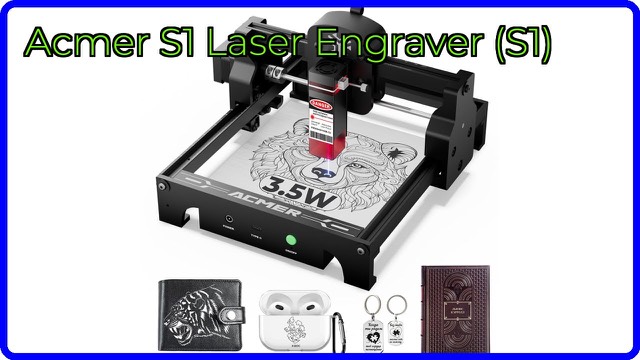
The ACMER S1 is a compact desktop laser engraver for hobby projects: personalising small wooden pieces, leather goods, acrylic and metal ornaments. It arrives pre-assembled and connects to a computer, so it is designed for people who want to start engraving without building a frame first.
How a diode laser engraver works
A machine like this moves a focused laser beam across the material under computer control. The beam's heat darkens, burns or marks the surface in the pattern of your design. In general, diode lasers of this size are best at engraving and light cutting of thin material, and results depend on the material, the speed and the number of passes.
ACMER lists a 2.5W laser (the listing also mentions a 3.5W option) and says it can engrave more than 100 different materials, including wood, metal, acrylic, leather and ceramic. In practice, small diode lasers typically mark some materials, such as bare metal or ceramic, by working with a coating or marking spray, so check what the manual says for each material.
Work area and positioning
The S1 has a 130 x 130 mm engraving area (about 5.1 inches square). ACMER says that is enough to process several small metal ornaments at once or to engrave small ceramics. A laser scale on the frame marks reference points along the X and Y axes, which helps you place a piece precisely and line up complex projects.
Pre-assembled and ready to use
Unlike kit-style machines, the S1 comes pre-assembled. It is operated from a computer, using engraving software. Limit switches on the X and Y axes help the machine find its limits and make resetting easy, which ACMER links to safer operation.
Size and portability
The listing gives the dimensions as about 10.2 x 8.3 inches (26 x 21 cm) with a very thin profile. ACMER describes it as extremely small and easy to carry, which suits a desk, a craft table or a small workspace.
Laser safety
Lasers can damage eyes and start fires. Standard advice is to wear laser-safe eyewear rated for the wavelength, never leave a running machine unattended, keep flammable materials away and provide ventilation, because engraving some materials produces smoke or fumes. Follow the manual and local rules, and avoid materials the manufacturer warns against.
Who it suits
It suits hobbyists, makers and small craft projects such as gifts, tags, coasters and small decorative pieces. It is a smaller machine, so larger sheets and deep cuts through thick material are outside what it is meant for.
What to check before you buy
- Work area: make sure your pieces fit within 130 x 130 mm.
- Materials: confirm that the ones you plan to use are suitable for a 2.5W diode laser.
- Software: check which computer operating systems and engraving software the maker supports.
- Safety gear and space: plan for eyewear, ventilation and a fire-safe surface.
- Laser power: the listing mentions both 2.5W and 3.5W, so confirm which version you are getting.
- Upkeep: keep the lens clean as the manual describes.
The short version
- A compact, pre-assembled desktop laser engraver from ACMER.
- 2.5W laser (3.5W also mentioned) and a 130 x 130 mm work area.
- X and Y limit switches and a frame scale for positioning.
- Used with a computer; suited to small craft and gift projects.
- Follow laser safety guidance and the manual.
Bloiq is reader-supported. Some links may earn us a commission; it never affects what we write. How we make money.