Home / Tech · Product overviews / PC / Gaming Mice · More from ASUS
ASUS ROG Gladius III Wired Gaming Mouse: features, specs and who it suits
A wired right-handed gaming mouse with a 19,000 dpi sensor tuned to 26,000 dpi, hot-swappable switch sockets, ROG Micro Switches and Aura Sync RGB lighting.
This page contains an affiliate link, marked as such. If you buy through it, Bloiq may earn a commission at no extra cost to you.
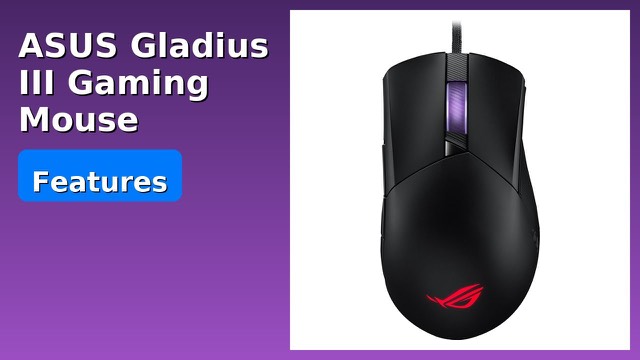
The ASUS ROG Gladius III is a wired gaming mouse with an asymmetrical shape for right-handed grips. Its standout feature is a socket design that lets you change the micro switches under the main buttons without soldering.
The sensor and what dpi means
Dpi (dots per inch) describes how far the cursor moves for a given hand movement. ASUS fits a 19,000 dpi optical sensor tuned to 26,000 dpi, with a range of 100 to 26,000 dpi and a stated 1% deviation. It is rated for tracking up to 400 inches per second at 50 g of acceleration. Most players use only a small part of that range, so the headline figure matters less than being able to set a speed you control comfortably. The listing quotes a 1000 Hz polling rate, meaning the computer is updated about 1,000 times a second.
Hot-swappable switches
The Push-Fit Switch Socket II design accepts traditional 3-pin mechanical switches and 5-pin Omron optical micro switches, and ASUS calls it an industry first. Mechanical and optical switches feel and sound different, so being able to change them lets you tune the click to your taste, or replace a worn switch. ASUS says the strengthened socket reduces wobble for a consistent click.
Buttons and switch quality
The listing describes a pivoted button design with no gap between button and switch, for quick actuation, and tuned firmware that filters out unintended clicks. The ROG Micro Switches are rated for 70 million clicks and use a gold-plated electro-junction for durability. ASUS says each switch is inspected and the left and right switches are paired to keep click-force differences within plus or minus 5 gram-force.
Shape, weight and glide
The classic asymmetrical shape is described as well suited to a variety of right-handed grip styles. ASUS says it is 30% lighter than its predecessor, which typically makes quick flicks easier. The mouse feet are round-edged and made of PTFE for a smooth glide, and the side panels are textured and non-slip. The cable is a flexible ROG Paracord, which tends to drag less on a desk than a stiff rubber cable.
The listed dimensions are about 5.0 x 3.0 x 2.0 inches (12.7 x 7.6 x 5.1 cm) and 0.5 lb (about 230 g).
Lighting
Laser-engraved ROG markings on the side panel have RGB lighting, and the mouse syncs with other compatible devices through Aura Sync.
Who it suits
It suits right-handed players, especially those who like to experiment with switches or want a design that allows a replacement switch later. Left-handed users would need a symmetrical shape instead.
What to check before you buy
- Hand size and grip: how the mouse fits your palm and fingers matters more than any spec.
- Handedness: the shape is made for right-handed use.
- Switch swapping: replacement switches are bought separately, and the process needs care, so read the instructions.
- Software: check that the companion software runs on your operating system.
- Connection: the listing text mentions 2.4 GHz as well as wired operation, while the product is described as wired, so confirm the connection type you want.
- Cable length: make sure it reaches your PC.
The short version
- Wired right-handed gaming mouse with a 19,000 dpi sensor tuned to 26,000 dpi.
- Push-Fit Switch Socket II accepts 3-pin mechanical and 5-pin Omron optical switches.
- ROG Micro Switches rated for 70 million clicks.
- 30% lighter than its predecessor, with PTFE feet and a paracord cable.
- Aura Sync RGB lighting.
Bloiq is reader-supported. Some links may earn us a commission; it never affects what we write. How we make money.