Home / Tech · Product overviews / Computers & Accessories / 2 in 1 Laptops · More from ASUS
ASUS Chromebook Flip C434 2-in-1: features, specs and who it suits
A 14-inch ASUS Chromebook Flip with a 360-degree hinge, touchscreen, Core m3 processor, 4GB RAM, 64GB storage and an all-metal body. What the specs mean.
This page contains an affiliate link, marked as such. If you buy through it, Bloiq may earn a commission at no extra cost to you.
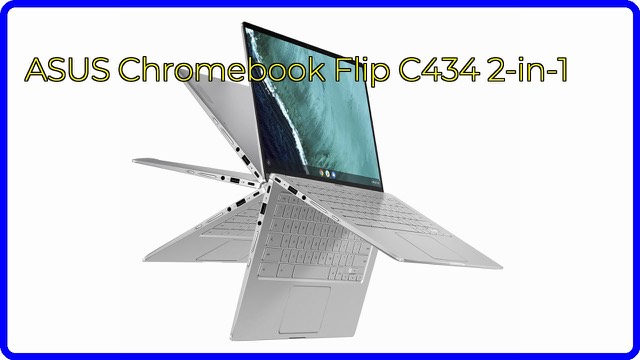
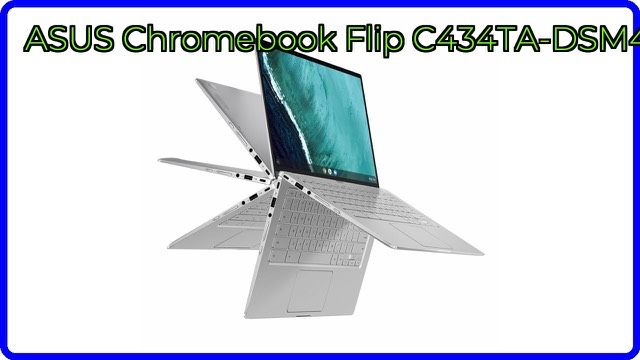
The ASUS Chromebook Flip C434 (model C434TA-DSM4T) is a 14-inch 2-in-1 laptop that runs Chrome OS. Its 360-degree hinge lets the touchscreen fold back into tent, stand and tablet positions, and its slim bezels fit a 14-inch screen into a body about the size of a 13-inch laptop. It suits people whose work and study live mostly in the browser and web apps.
What Chrome OS means for how you use it
Chrome OS is Google's lightweight operating system, built around the Chrome browser and web apps. Chromebooks typically start quickly and need little maintenance, and they use less storage than Windows laptops, which is why 64GB can be workable here. Chrome OS does not run Windows programs, so check that the software you rely on has a web or compatible app version.
The display and the flip hinge
The screen is a 14-inch Full HD (1920 x 1080) touchscreen. ASUS calls its slim-bezel design 4-way NanoEdge, with bezels about 5mm thin on every side, which is how the larger screen fits a 13-inch footprint. The durable 360-degree hinge supports four modes:
- Laptop: typing and general use.
- Tent: the screen faces out, handy for watching things on a table.
- Stand: the keyboard folds under for touch-first use.
- Tablet: fully folded back for reading and sketching.
Processor, memory and storage
ASUS lists an Intel Core m3-8100Y processor, up to 3.4 GHz. This is a low-power chip aimed at light, quiet, efficient laptops. It handles browsing, documents, streaming and many tabs, which ASUS says it does with ease. The Chromebook has 4GB of DDR3 memory and 64GB of eMMC storage. eMMC is flash storage soldered to the board; it is generally slower than an SSD but fine for a browser-based system. If you want more room, cloud storage and external drives help.
Ports, keyboard and build
There are two USB Type-C (Gen 1) ports and one Type-A (Gen 1) port. Type-C ports are typically used for charging, data and video output, so check the manual for which port does what. The keyboard is backlit, which helps in dim rooms. The body is all-aluminium, which ASUS says is both durable and lightweight at about 3 lb (the listing shows 2.9 lb).
Who it suits
It suits students, travellers and anyone who wants a light second computer for web work, video calls, streaming and note-taking, where the touchscreen and flip hinge are useful. It is not meant for demanding games or software that only runs on Windows or macOS.
What to check before you buy
- Software: confirm your key apps work on Chrome OS or in the browser.
- Support period: Chromebooks get software updates for a set period; check the end date for this model, since this is an older design.
- Memory and storage: 4GB RAM and 64GB suit light use; heavy multitasking may feel tight.
- Ports: with two Type-C ports and one Type-A, you may want a dock or adapter.
- Condition and what's included: check which charger and accessories are in the box.
- Touch use: the flip modes are handy, but a 14-inch screen is large as a tablet.
The short version
- A 14-inch Full HD touchscreen Chromebook with a 360-degree hinge.
- Intel Core m3-8100Y, 4GB DDR3 and 64GB eMMC storage.
- Two USB-C and one USB-A port, plus a backlit keyboard.
- All-aluminium body of about 3 lb.
- Runs Chrome OS, not Windows software.
Bloiq is reader-supported. Some links may earn us a commission; it never affects what we write. How we make money.