Home / Tech · Product overviews / Computers & Accessories / 2 in 1 Laptops · More from ASUS
ASUS Chromebook Flip C434 2-in-1: features, specs and who it suits
A 14-inch Full HD touchscreen Chromebook in an all-aluminium body, with a Core m3-8100Y, 4GB RAM, 32GB eMMC and a 360-degree hinge. What the specs mean.
This page contains an affiliate link, marked as such. If you buy through it, Bloiq may earn a commission at no extra cost to you.
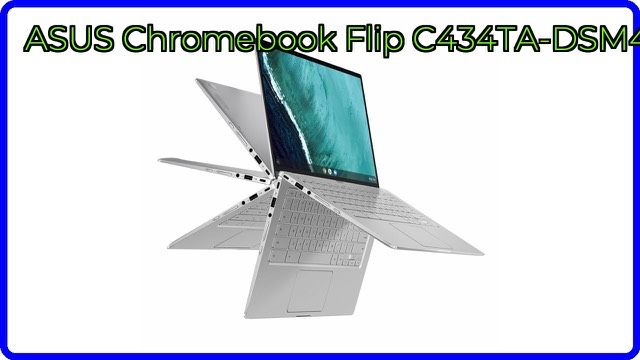
The ASUS Chromebook Flip C434 (model C434TA-DH342T) is a 2-in-1 laptop that runs Chrome OS. It combines a 14-inch Full HD touchscreen with a 360-degree hinge, so it works as a laptop, a tent for watching video, a stand or a tablet. ASUS describes it as an all-metal, ultrabook-style Chromebook with a silver finish.
A big screen in a smaller body
The display uses ASUS's 4-way NanoEdge design, with bezels about 5 mm thin on every side. ASUS says this lets a 14-inch screen fit in the body of a 13-inch laptop. The resolution is Full HD (1920 x 1080), which is sharp at this size for documents, web pages and video. Thin bezels matter in daily use because they put more screen into the same footprint, which makes the laptop easier to carry and use on a small desk or tray table.
Four ways to use the hinge
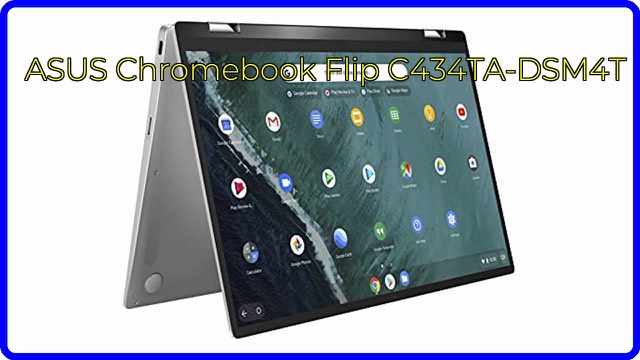
The durable 360-degree hinge lets the screen flip all the way around. In laptop mode you type as normal. In tent and stand modes the keyboard is tilted out of the way, which suits video calls, recipes and streaming. In tablet mode the touchscreen takes over for reading, drawing and tapping through apps. Many Chromebooks can run Android apps, which tend to be more comfortable with a touchscreen; confirm support for this model on Google's device list.
Processor, memory and storage
The Intel Core m3-8100Y processor is listed at up to 3.4 GHz, with 4GB of LPDDR3 memory and 32GB of eMMC storage. The "Y" series are low-power chips meant for slim machines, trading peak speed for efficiency. ASUS says it handles a lot of tabs and apps with ease. As a general rule, 4GB suits everyday multitasking but may slow with many heavy tabs. The 32GB of eMMC storage is modest and best treated as space for the system, apps and a few downloads, with most files kept in the cloud or on an external drive.
Ports, keyboard and body
There are two USB 3.2 Type-C (Gen 1) ports and one USB 3.2 Type-A (Gen 1) port; ASUS notes that transfer speeds may vary. The keyboard is backlit, which helps in dim rooms. The body is all aluminium and weighs 3.2 lb (about 1.45 kg), with listing dimensions of 12.6 x 8.0 x 0.6 inches (about 32 x 20 x 1.5 cm).
Chrome OS in brief
Chrome OS is built around the Chrome browser and updates automatically. It runs web apps, online office tools and, on many devices, Android apps. It doesn't run standard Windows programs, so check that the software you rely on has a web or Android version.
Who it suits
It suits students, home users and travellers who want a slim, simple laptop for browsing, writing, streaming and video calls, with the option to fold it into a tablet. It is less suited to people who need desktop-only software or a lot of local storage.
What to check before you buy
- Software: make sure your apps run on Chrome OS.
- Storage: 32GB is small, so plan for cloud or external storage.
- Update support: check Google's end-of-support date for this model.
- Accessories: with Type-C ports, you may want adapters for older devices.
- Battery: the listing doesn't state battery life, so check ASUS's specifications.
- Condition and warranty: confirm new or refurbished status and warranty terms.
The short version
- 14-inch Full HD touchscreen with 5 mm NanoEdge bezels and a 360-degree hinge.
- Intel Core m3-8100Y, 4GB LPDDR3 and 32GB eMMC.
- Two USB-C and one USB-A port, plus a backlit keyboard.
- All-aluminium, 3.2 lb, running Chrome OS.
Bloiq is reader-supported. Some links may earn us a commission; it never affects what we write. How we make money.