Home / Tech · Product overviews / Computers & Accessories / 2 in 1 Laptops · More from ASUS
ASUS Chromebook Flip C434TA: 14-inch 2-in-1 Chromebook, specs explained
The ASUS Chromebook Flip C434TA is a 14-inch touchscreen 2-in-1 with a Core m3 chip, 4GB RAM and 64GB eMMC. What the specs mean and who it suits.
This page contains an affiliate link, marked as such. If you buy through it, Bloiq may earn a commission at no extra cost to you.
The ASUS Chromebook Flip C434TA is a 14-inch touchscreen laptop that folds back into a tablet. It runs Chrome OS, which is built around web apps and cloud storage, and it is aimed at people who want a light, flexible machine for browsing, writing, streaming and study. Below is what the specs mean and what to confirm before choosing it.
A hinge that turns one laptop into four
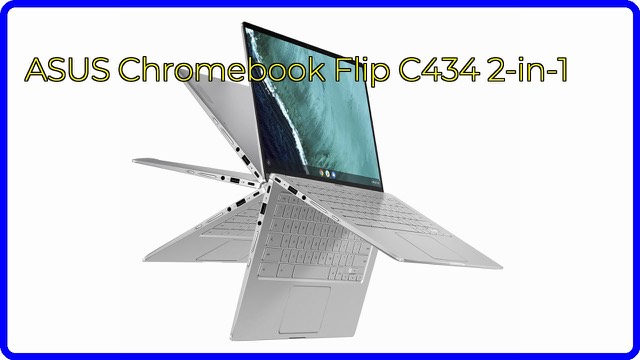
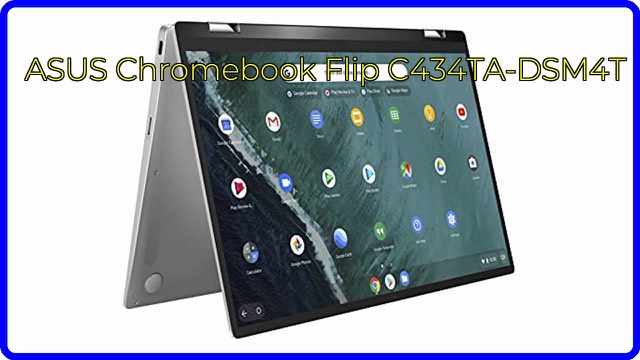
The 360-degree hinge gives four modes, which ASUS lists as laptop, stand, tent and tablet. Laptop mode is for typing. Stand mode puts the keyboard behind the screen, which is handy for watching video or following a recipe. Tent mode props the device on its edges, and tablet mode folds the keyboard flat behind the display for touch use. Because the screen is 14 inches, tablet mode is large compared with a typical tablet, but it works well for reading and note-taking.
Display
The panel is a Full HD (1920 x 1080) touchscreen with what ASUS calls a 4-way NanoEdge display, meaning very narrow bezels on all four sides. In practice, narrow bezels let a 14-inch screen fit in a body closer to a smaller laptop. The listing also describes an all-metal finish.
Performance: Core m3, 4GB and eMMC
Inside is an Intel Core m3-8100Y at 1.1 GHz, boosting up to 3.4 GHz, with Intel HD Graphics 615. This is a low-power chip, typically chosen for thin designs that can run without a fan. It handles web browsing, documents, video and Android-style apps on Chrome OS comfortably, but it isn't designed for heavy multitasking or demanding creative work.
Memory is 4GB of LPDDR3, and storage is 64GB of eMMC. eMMC is flash storage soldered to the board; it is slower than a typical SSD, and 64GB is modest. Chrome OS keeps most files in the cloud, so many users manage with this, and the SD card reader gives a simple way to add space.
Ports and wireless
The listing gives a generous set for a thin machine:
- one USB 3.1 Gen 1 Type-C port;
- one USB 3.0 and two USB 2.0 ports;
- one HDMI output;
- a headphone/microphone combo jack and an SD card reader.
Wireless is 802.11ac Wi-Fi and Bluetooth 4.2. The keyboard is backlit, and there is a webcam for video calls.
Chrome OS in brief
Chrome OS starts quickly, updates in the background and relies mostly on the browser, web apps and, on supported devices, Android apps. It doesn't run traditional Windows or Mac programs. Support for software updates runs for a limited period on each model, so it's worth checking the manufacturer's stated update schedule.
Who it suits
It suits students, travellers and households that want a light device for everyday tasks, and anyone who likes switching between typing and touch. It is a weaker fit for people who rely on desktop-only software, large local files or heavy photo and video editing.
What to check before you buy
- Condition: this listing is for a renewed unit, so check what the seller says about condition, battery and warranty.
- Software support: confirm how long this model receives Chrome OS updates.
- Apps: make sure the tools you rely on have web or Android versions.
- Storage: decide whether 64GB plus an SD card is enough.
- Accessories: check what comes in the box, including the charger.
The short version
- A 14-inch Full HD touchscreen Chromebook with a 360-degree hinge and four modes.
- Intel Core m3-8100Y, 4GB LPDDR3 and 64GB eMMC.
- USB-C, USB-A, HDMI, SD card reader and a backlit keyboard.
- Runs Chrome OS, not Windows.
- Best for browsing, study and everyday work rather than heavy software.
Bloiq is reader-supported. Some links may earn us a commission; it never affects what we write. How we make money.