Home / Tech · Product overviews / Accessories / Charging Stations · More from Anker
Anker Nano A91C4 7-in-1 Charging Station: features, specs and who it suits
A compact 100W desktop charging station with two USB-C ports, two USB-A ports and three AC outlets. What the specs mean and what to check before you buy.
This page contains an affiliate link, marked as such. If you buy through it, Bloiq may earn a commission at no extra cost to you.
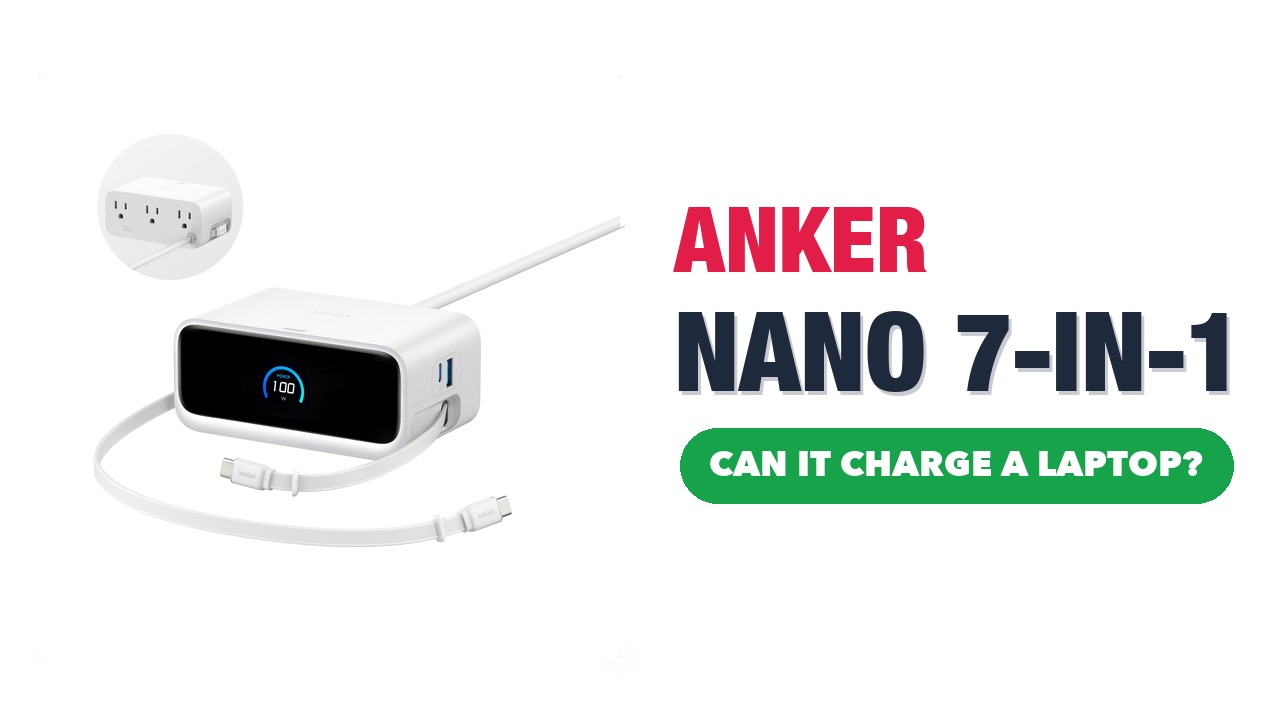
The Anker Nano A91C4 is a compact power strip with USB charging built in. It combines three AC outlets with two USB-C and two USB-A ports, so a laptop, a phone and a few other devices can share one cable and one wall socket. It's aimed at desks and bedside tables where chargers tend to pile up.
Seven ports in a small body
The three AC outlets are on the back and the four USB ports are on the front, where they're easy to reach. The body measures about 4.6 x 2.5 x 1.7 inches (around 11.7 x 6.4 x 4.3 cm), so it sits on a desk rather than hiding behind it. Anker says the layout keeps a workstation tidy, with only one cord, a 5 ft (1.5 m) thin cable, running to the wall.
What 100W maximum means
The 100W figure is the most the strip can deliver across its USB ports. Anker says it can charge a 16-inch MacBook Pro (96W) to 50% in 33 minutes. In practice, USB power is shared between the ports, so a laptop charging alongside a phone typically gets less than the full amount. Anker's own charging figures are test results from specific conditions, and your results depend on the device, cable and battery level.
A laptop also needs a USB-C cable rated for its power needs. Phones and tablets draw much less, and most will charge quickly from a USB-C port with Power Delivery.
USB-C and USB-A
USB-C with Power Delivery is the modern standard for laptops, tablets and most recent phones. The USB-A ports suit older accessories, such as earbuds, e-readers and small gadgets. Having both types means you don't need to buy new cables for everything you own.
ActiveShield safety system
Anker says its ActiveShield system monitors temperature 3,000,000 times a day to protect connected devices. It's a built-in safeguard, not a replacement for sensible use. Keep the strip clear of bedding and covers, don't overload the outlets, and follow the manual and local electrical codes.
What the AC outlets are for
The three AC outlets let you plug in things that use a normal plug, such as a lamp, a monitor or a laptop's own power brick. Check the total power limit in the manual before connecting several high-draw items at once.
What's in the box
Anker lists the charging station with its cord, a welcome guide, an 18-month warranty, and support from customer service. The listing also describes a connected-equipment warranty; check the terms and exclusions for yourself.
Who it suits
It suits home workers, students in small rooms, and anyone with a bedside table full of chargers. It also works as a tidy charging point for a household with several phones and tablets. If you travel, its size is manageable, though a plug-in strip with a 5 ft cord is bulkier than a single wall charger.
What to check before you buy
- Your laptop's power needs: confirm its charger wattage against the strip's 100W USB limit.
- Shared power: the maximum is shared across ports, so heavy use of several ports may slow charging.
- Cables: you'll need your own USB-C and USB-A cables.
- Plug and socket: check the plug fits your wall outlet and the cord reaches.
- Space: allow about 4.6 inches of desk width and room for airflow.
The short version
- A 7-in-1 charging station: three AC outlets, two USB-C and two USB-A ports.
- 100W maximum USB output, shared across ports.
- Thin 5 ft cord and a compact body of about 4.6 x 2.5 x 1.7 inches.
- ActiveShield temperature monitoring, as Anker describes it.
- Comes with a welcome guide and an 18-month warranty.
Bloiq is reader-supported. Some links may earn us a commission; it never affects what we write. How we make money.