Home / Tech · Product overviews / Computers & Accessories / Monitor Accessories · More from ASUS
ASUS ZenScreen Stand MTS02D for portable monitors: specs and fit
A tilt, pivot and height-adjustable stand for ASUS ZenScreen and ROG Strix portable monitors, with a 1/4-inch tripod socket. What it fits and how it works.
This page contains an affiliate link, marked as such. If you buy through it, Bloiq may earn a commission at no extra cost to you.
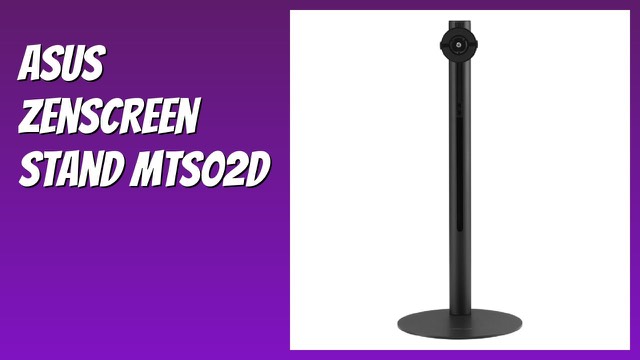
The ASUS ZenScreen Stand MTS02D is an adjustable stand for portable monitors. It lifts a thin, lightweight display to a more comfortable height and lets you change its angle, which is handy for a home office, a shared desk or a laptop-plus-second-screen setup.
What the stand does
Portable monitors are slim and often come with a folding cover that doubles as a basic stand. A dedicated stand gives more control. ASUS describes the MTS02D as offering tilt, pivot and height adjustment so that the screen sits at eye level. Placing a screen at eye level is a common ergonomic recommendation, since it lets you look straight ahead instead of down at a laptop.
Adjustments in detail
- Tilt: angle the screen up or down to reduce glare or suit your seating position.
- Pivot: rotate between landscape and portrait. Portrait is useful for reading documents, coding or long web pages.
- Height: raise or lower the display. The stand stands about 15.3 inches (roughly 39 cm) tall.
Size and weight
The stand measures 6.3 inches wide and deep, which is a compact footprint on a desk, and weighs 2 lb (about 0.9 kg). It is rated to support 1.3 to 2.5 lb (590 g to 1,150 g). That range matters: a monitor lighter than the minimum may not sit securely, and one heavier than the maximum could tip or strain the stand.
Compatible monitors
ASUS lists these ZenScreen models: MQ13AH, MB14AC, MB165B, MB166B, MB166C, MB16AH, MB16AH-Z, MB16AHT, MB16ACV, MB16AWP and MQ16AH. It also lists ROG Strix portable gaming monitors XG16AHP, XG16AHPE, XG17AHP and XG17AHPE.
The 1/4-inch tripod socket
The listing says the stand works with monitors that have a 1/4-inch tripod socket. That is the standard screw thread used on cameras and tripods. Other monitors with this socket may fit, but the weight limit still applies and ASUS only names the models above. Check your monitor's weight and the socket's position.
Packaging
ASUS says the stand comes in sustainable packaging.
Who it suits
It suits people who use a portable monitor at a desk and want a steadier, higher position than a folding case gives, and those who switch between landscape and portrait.
What to check before you buy
- Model: find your monitor's exact model number and compare it with the compatibility list.
- Weight: confirm the monitor, without any extra case, falls inside the 590 g to 1,150 g range.
- Socket: check for the 1/4-inch tripod socket and where it sits.
- Desk space: allow for the 6.3-inch square base and 15.3-inch height.
- Cables: think about how your cables will route when the monitor pivots.
The short version
- An adjustable stand, model MTS02D, with tilt, pivot and height adjustment.
- About 15.3 inches tall, 6.3 inches wide and deep, weighing 2 lb.
- Rated for monitors of 1.3 to 2.5 lb (590 g to 1,150 g).
- Lists compatible ASUS ZenScreen and ROG Strix portable monitors, plus 1/4-inch tripod socket compatibility.
Bloiq is reader-supported. Some links may earn us a commission; it never affects what we write. How we make money.