Home / Tech · Product overviews / Computers & Accessories / Monitor Accessories · More from ASUS
ASUS ZenScreen Stand MTS02D: what it fits, how it adjusts and who it suits
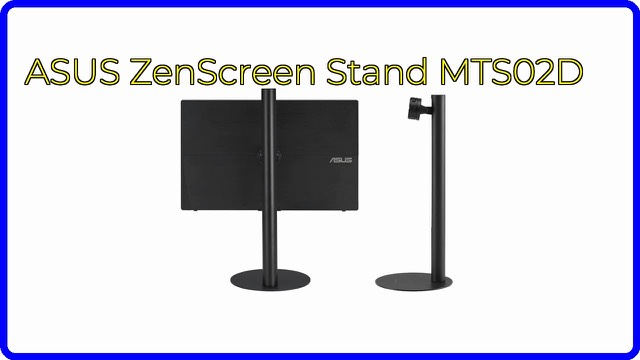
The ASUS ZenScreen Stand MTS02D is an adjustable stand for ASUS portable monitors, with tilt, swivel, height adjustment and a 1/4-inch tripod thread.
This page contains an affiliate link, marked as such. If you buy through it, Bloiq may earn a commission at no extra cost to you.
The ASUS ZenScreen Stand MTS02D is an adjustable stand designed for certain ASUS portable monitors. Portable screens are slim and light, and many rely on a fold-out cover or a small built-in kickstand. This stand raises a portable monitor to a more comfortable viewing position on a desk.
What it is for
The stand is an accessory, not a monitor. ASUS describes it as an ergonomic stand with tilt, rotation and height adjustment, so you can set the screen at a comfortable eye level. Portable monitors placed flat on a desk tend to sit low, which encourages looking down. A height-adjustable stand lets you lift the display closer to eye level, which many people find more comfortable over a long working day.
Tilt, swivel and height
Three adjustments are listed:
- Tilt changes the vertical angle of the screen, useful for reducing reflections from windows or lights.
- Swivel (rotation) turns the screen left or right, handy for sharing it with someone beside you or angling it away from glare.
- Height adjustment raises and lowers the screen so it matches your seated eye line.
Together these let you set up a second screen next to a laptop, or a single portable display, without stacking books under it.
Which monitors it fits
ASUS names the compatible ZenScreen and portable ROG Strix gaming models: MQ13AH, MB14AC, MB165B, MB166B, MB166C, MB16AH, MB16AH-J, MB16AHT, MB16ACV, MB16AWP, MQ16AH, XG16AHP, XG16AHPE and XG17AHP, plus XG17AHPE. Compatibility is the key point with a stand like this. If your monitor model is not on the list, there is no assurance it will attach properly, so check the model number printed on your monitor against the list.
The 1/4-inch tripod thread
The listing says the stand is compatible with a 1/4-inch tripod thread. That is the standard screw size used on cameras and tripods. Photography accessories commonly use it, so it suggests the stand can be combined with other mounts or camera-style supports. The listing does not describe exactly how, so look at ASUS's manual or product page before relying on it.
Size and weight
The weight is listed as 2.0 lb (about 0.9 kg). That is light enough to carry in a bag with a laptop, but the listing doesn't give the dimensions, so check the folded and open sizes if you plan to travel with it. A heavier base usually helps stability, so a light stand deserves a gentle check of its steadiness on your desk.
Who it suits
It suits owners of the listed ASUS portable monitors who work at a desk, in a hot-desk office or in a home study, and who want the screen higher and adjustable. It also suits people who want an upgrade from the monitor's built-in stand or cover. It has little use for anyone with a monitor outside the list.
What to check before you buy
- Model match: compare your monitor's exact model number with the list above.
- Desk space: leave room for the base and for the cables to run.
- Height range: confirm the highest position reaches your eye level when seated.
- Stability: with a light stand, avoid heavy touch interaction if the monitor is a touchscreen model.
- Cables: check that your video cable can bend and reach as the screen moves.
- Portability: if you travel, check the stand's size when folded.
The short version
- An adjustable stand made for specific ASUS ZenScreen and portable ROG Strix monitors.
- Tilt, rotation and height adjustment for better eye-level positioning.
- Compatible with a 1/4-inch tripod thread.
- Weighs about 2.0 lb (0.9 kg).
- Check your monitor's model number against ASUS's compatibility list first.
Bloiq is reader-supported. Some links may earn us a commission; it never affects what we write. How we make money.