Home / Tech · Product overviews / Computers & Accessories / Minis · More from ASUS
ASUS Chromebox 5a CHROMEBOX5a-SC041UN: a mini desktop for Chrome OS
A small Chrome OS desktop with an Intel Celeron 7305, 4GB RAM, 128GB NVMe SSD, Wi-Fi 6E, 2.5 Gbps Ethernet and support for up to four 4K displays.
This page contains an affiliate link, marked as such. If you buy through it, Bloiq may earn a commission at no extra cost to you.
The ASUS Chromebox 5a (model CHROMEBOX5a-SC041UN) is a mini desktop that runs Chrome OS. It is a small box that connects to your own monitor, keyboard and mouse, and it suits offices, classrooms, reception desks and shared spaces. Here is what its specifications mean.
What Chrome OS is
Chrome OS is Google's operating system, centred on the browser, web apps and cloud services, and it can also run Android apps and some other software depending on the device and settings. It is typically simple to manage, starts quickly and receives automatic updates. It does not run traditional Windows programs, so check that the tools you need work in a browser or are available as apps.
Processor, memory and storage
The Chromebox uses an Intel Celeron 7305 processor with 4GB of DDR4 memory. Chrome OS is lightweight, so this is a modest setup aimed at web apps, video calls, documents and streaming. Heavy multitasking with many tabs may push the memory, as 4GB leaves little spare.
Storage is a 128GB M.2 NVMe SSD on a PCIe G4x4 connection. NVMe drives are quicker than older SATA drives, which shortens start-up and file-opening times. Because Chrome OS relies heavily on cloud storage, 128GB is typically enough for local files.
Up to four displays
ASUS lists dual HDMI, one DisplayPort and one USB-C output, supporting up to four 4K displays. That is useful for dashboards, trading screens, digital signage or an office desk with several monitors. To drive four screens at once, you need the right cables and monitors, and a single 4K output at 60Hz is more demanding on the processor than a 1080p one. The listing says "quad-display" without further detail, so check the manual for supported resolutions and refresh rates.
Networking
The Chromebox has dual-band Intel Wi-Fi 6E and Bluetooth, plus 2.5 Gbps Ethernet (the title also mentions a gigabit LAN port). Wi-Fi 6E adds the 6GHz band for devices and routers that support it. Wired Ethernet is typically more stable than Wi-Fi in an office, and 2.5 Gbps lets you use a faster network when the rest of the equipment supports it.
Security and mounting
A Titan C security chip and a Kensington lock slot provide what ASUS calls business-grade security. The Titan C chip is part of the system's protection, and the lock slot allows the box to be secured with a cable lock to a desk. A VESA mount means you can fix the unit to the back of a compatible monitor or a wall, which keeps a desk tidy.
Size
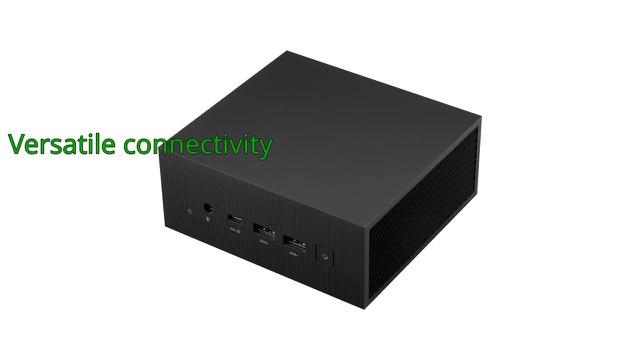
The unit measures 6.6 x 6.5 x 1.8 inches and weighs about 1.8 lb, so it fits almost anywhere.
Who it suits
It suits schools, offices, shops, call centres and home users who work mainly in the browser and want a small, quiet machine. People who need Windows-only software or demanding creative tools should look at other options.
What to check before you buy
- Software: confirm your key applications work on Chrome OS.
- Peripherals: the box has no screen, keyboard or mouse; you must supply them.
- Displays: check that your monitors' inputs match the HDMI, DisplayPort or USB-C outputs.
- Network: check your router and wiring if you want to use 2.5 Gbps Ethernet or Wi-Fi 6E.
- Management: organisations should check how the device is enrolled and managed.
- Support period: look up how long Chrome OS updates are provided for this model.
The short version
- A small Chrome OS desktop with an Intel Celeron 7305, 4GB DDR4 and 128GB NVMe SSD.
- Dual HDMI, DisplayPort and USB-C outputs for up to four 4K displays.
- Wi-Fi 6E, Bluetooth and 2.5 Gbps Ethernet.
- Titan C security chip, Kensington lock slot and VESA mount.
- About 1.8 lb and 6.6 x 6.5 x 1.8 inches.
Bloiq is reader-supported. Some links may earn us a commission; it never affects what we write. How we make money.