Home / Tech · Product overviews / Computers & Accessories / Docking Stations · More from Anker
Anker Nano 13-in-1 docking station: features, specs and who it suits
A 13-in-1 USB-C dock for up to three monitors, with 100W laptop charging and a 6-in-1 hub that detaches for travel. What its ports and display modes mean.
This page contains an affiliate link, marked as such. If you buy through it, Bloiq may earn a commission at no extra cost to you.
The Anker Nano Laptop Docking Station (model A83C3) turns one USB-C cable into a full desk setup: up to three monitors, wired internet, USB devices, card readers and laptop charging. Its twist is a 6-in-1 hub that snaps out of the front for travel, so one purchase covers both the desk and the laptop bag. Here is what its ports and numbers mean in practice.
Two devices in one
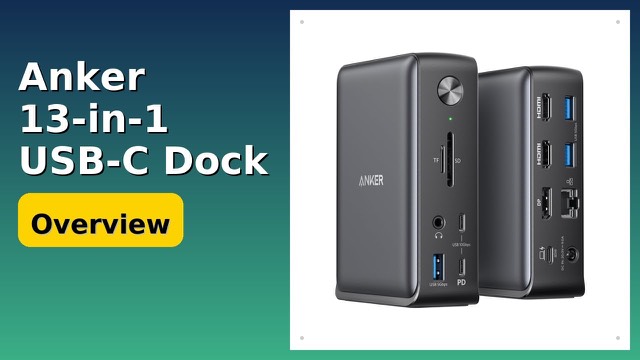
The main unit is a 13-in-1 desktop dock that stands upright and measures about 3.7 x 1.6 x 5.5 inches (roughly 9.4 x 4.1 x 14 cm). A release button on top frees the removable hub, which plugs straight into a laptop's USB-C port when you're away from your desk.
On its own, the hub offers HDMI (up to 4K at 60Hz), a 5Gbps USB-C port, a 5Gbps USB-A port, SD and microSD (TF) card slots and a USB-C power input. With a USB-C charger connected to that input (up to 100W in), it can pass up to 85W through to the laptop, according to Anker.
Up to three monitors, with limits
The dock has two HDMI ports and one DisplayPort. Anker lists three modes:
- one monitor at up to 4K and 60Hz;
- two monitors at up to 2K and 60Hz;
- three monitors at up to 1080p and 60Hz.
The resolution drops as you add screens because all the video travels over a single USB-C connection, and its bandwidth is shared. For spreadsheets, trading screens or editing timelines, three 1080p monitors give plenty of room; for detailed 4K work, one screen gets the sharpest picture.
The operating system matters too. On Windows, each external monitor can show different content. On macOS, multiple external displays only mirror the same image, so Mac users can't spread separate windows across two or three monitors with this dock. Only the HDMI and DisplayPort outputs carry video; the USB ports don't.
The ports, one by one
Besides the video outputs, there's one USB-C upstream port for the laptop, two USB-C data ports (one at 5Gbps and one at 10Gbps), three USB-A ports, Gigabit Ethernet, a 3.5mm headphone and mic jack, SD and microSD card slots and the DC power input. According to the port diagram, two of the USB-A ports run at 480Mbps, which is fine for a keyboard, mouse or receiver, while the faster ports suit drives and card readers. Anker says the 10Gbps port moves a 1GB video in under two minutes.
Charging the laptop
The dock comes with a 140W power adapter and delivers up to 100W to the laptop over the same USB-C cable that carries data and video. The adapter's extra headroom feeds the monitors, drives and other accessories so the laptop still gets its share. Most thin-and-light laptops charge at 65W to 100W, so they should charge normally; some high-powered gaming or workstation laptops draw more and may charge slowly under heavy load.
Setup and what's in the box
Setup is plug and play, with no drivers to install. The dock only works with a laptop connected: the blue light strip and all the ports switch on once the laptop is plugged into the upstream port, and a switch turns the light strip off if you prefer. The box holds the dock with its hub, a 3 ft 10Gbps USB-C cable, the 140W adapter with a 5 ft cord and a welcome guide. Anker lists an 18-month warranty.
Who it suits
It suits Windows and ChromeOS laptop users who work at a desk with several monitors and also travel, and anyone who wants one cable to connect everything when they sit down.
What to check before you buy
- Your laptop's USB-C port: it needs to support video (DisplayPort Alt Mode), Power Delivery and data, as Thunderbolt and USB4 ports typically do. A data-only or charging-only port won't drive monitors.
- Operating system: on macOS, external monitors mirror rather than extend.
- Resolution: decide whether you need one 4K screen or three 1080p screens.
- Monitor cables: you'll need HDMI or DisplayPort cables for each monitor.
- Charging needs: check that 100W covers the wattage of your laptop's own charger.
The short version
- A 13-in-1 USB-C dock with a detachable 6-in-1 hub for travel.
- Up to three monitors (one 4K, two 2K or three 1080p, all at 60Hz); mirrored only on macOS.
- Three USB-A, two USB-C data ports (up to 10Gbps), Gigabit Ethernet, an audio jack and card slots.
- Up to 100W laptop charging from the included 140W adapter.
- Plug and play, with an 18-month warranty from Anker.
Bloiq is reader-supported. Some links may earn us a commission; it never affects what we write. How we make money.