Home / Tech · Product overviews / Camera & Photo / USB Microscopes · More from TOMLOV
TOMLOV DM9 Pro 7-Inch Digital Microscope: features, specs and who it suits
A 7-inch HDMI digital microscope with 10X-1200X magnification, 16MP photos, 1080P video, 8 LED lights plus side lights, and a wired controller.
This page contains an affiliate link, marked as such. If you buy through it, Bloiq may earn a commission at no extra cost to you.
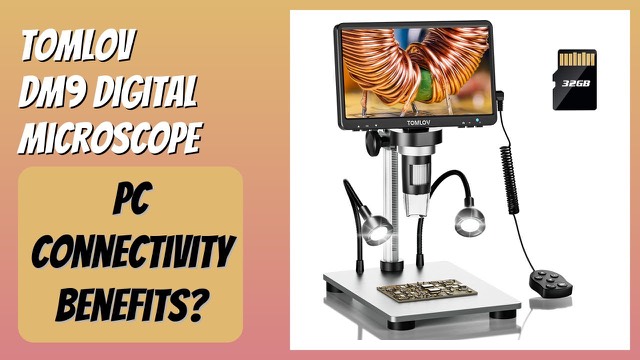
The TOMLOV DM9 Pro is a digital microscope with a built-in 7-inch screen. It can run on its own, show its image on a TV or projector over HDMI, or connect to a Windows or macOS computer over USB. TOMLOV points it at coin collecting, electronics soldering, repair work and hobby science. Here is what the specs mean in use.
Screen, resolution and photos
The 7-inch IPS screen shows 1920x1080 video with a 178-degree viewing angle, so the picture stays consistent when you look at it from the side. The camera takes 16MP photos. Having a screen built in means you do not need a computer for basic use, which is handy at a workbench. TOMLOV has pre-installed a Micro SD card in the slot to avoid it getting lost in shipping.
What 10X-1200X magnification means
The listing gives a range of 10X to 1200X, and TOMLOV notes that magnification is adjusted by changing the distance between lens and object. Digital microscope magnification figures depend on screen size and how the image is displayed, so they are best treated as a guide. In practice, the usable level is set by focus, lighting and how steady the stand is, and the very highest settings can look soft.
Lighting
Eight adjustable LED lights ring the lens, and two gooseneck side lights add angled illumination. Both sets can be dimmed independently. Lighting from different directions matters for shiny items such as coins and solder joints, where glare from a single overhead source can hide detail.
Stand and controller
For coins, TOMLOV supplies a 10-inch extended aluminum alloy bracket to give a full view of the coin, and the base is aluminum for stability. A controller lets you take photos, record video and change settings without touching the screen, which prevents shake in the image.
Connections
HDMI sends a 1080P live image to a TV or projector for a larger view or for sharing with a group. USB connects to Windows and macOS computers for viewing, and for saving images there. Check the manual for software requirements.
Where it fits
TOMLOV lists circuit board and SMD component inspection, soldering, repair and servicing small mechanisms, plant observation, jewellery inspection and coin identification. It also suggests "backyard science" with children, viewing rocks, minerals and plants. Children should be supervised, as with any equipment that includes lights and cables.
What to check before you buy
- Working distance: at high magnification you work close to the lens, which can make soldering awkward. Check the manual for working distance.
- Desk space: the stand and bracket need a stable surface of their own.
- Power: confirm how the unit is powered and whether it needs a nearby socket.
- Computer software: check that your operating system version is supported for USB use.
- Display connections: make sure your TV or projector has an HDMI input and that you have a cable if one is not included.
- Storage: note the Micro SD card capacity and file format for photos and video.
The short version
- 7-inch 1080P IPS screen with 16MP photos and 10X-1200X magnification.
- 8 LED ring lights plus 2 gooseneck side lights, all dimmable.
- HDMI output for TVs and projectors, and USB for Windows and macOS.
- Controller, 10-inch aluminum bracket and a pre-installed Micro SD card.
Bloiq is reader-supported. Some links may earn us a commission; it never affects what we write. How we make money.